Documentation

At the table

Game controls

Each designer controls how moves work inside their game. Boardweaver provides the surrounding match controls.

Where to look What you can do
Rules Read the game's rulebook without leaving the match.
Match controls Find sound, display, and exit options available for this match.
Board Use the game's own buttons, pieces, and highlighted choices.
History or playback Review moves when the game supports it.
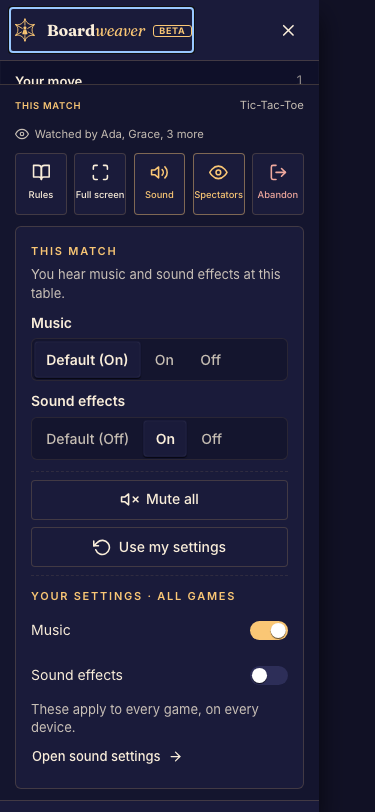
The host match menu includes spectator access and the action to end the match. Other roles see different actions.
The host match menu includes spectator access and the action to end the match. Other roles see different actions. Example data from the local development UI. Select the image to enlarge.
While reviewing moves, the match bar offers Back, Play or Pause, Forward, and Skip to now, with Rules and match actions alongside.
While reviewing moves, the match bar offers Back, Play or Pause, Forward, and Skip to now, with Rules and match actions alongside. Example data from the local development UI. Select the image to enlarge.
The phone drawer brings match switching and sound controls into reach without leaving the game.
The phone drawer brings match switching and sound controls into reach without leaving the game. Example data from the local development UI. Select the image to enlarge.

On a small screen

Open the match menu when controls do not fit beside the board. Use full screen where available. Some games have their own pan, zoom, or layout controls; these are not universal keyboard shortcuts.

Before confirming an exit, read Leave or end a match. For past moves, see Review moves during a match.

Need a hand with this?

Join our Discord