Change the state
The game logic changes the state only through the Table that setup and apply_action receive. Each Table method records the change for the match's history and animations. Read the state at any time with table.state().
If apply_action returns Err, every change the call made is undone, including its log lines and its allow_undo.
Maps
| Method | Does |
|---|---|
set(of, key, value) |
Sets one key of a map, or removes it when value is None. |
write(of, &value) |
Replaces a whole map with your serde type. |
update(of, |value: &mut T| ...) |
Reads a map as T, changes it, and writes it back. |
of is a StateOf (The state). write keeps a field that serializes as null; add #[serde(skip_serializing_if = "Option::is_none")] to remove the key instead.
Pieces
| Method | Does | Returns |
|---|---|---|
add_piece(space_id, piece) |
Puts a piece at the end of a space. | its index |
insert_piece(space_id, index, piece) |
Puts a piece at index. Later pieces move up. |
|
remove_piece(space_id, index) |
Takes a piece out. Later pieces move down. | the Piece |
move_piece(from, index, to) |
Moves a piece to the end of to, which may be from. |
its new index |
move_piece_to(from, index, to, to_index) |
Moves a piece to to_index, counted after the piece has left from. |
|
shuffle(space_id, rng) |
Shuffles a space's pieces. | |
set_public_kind(space_id, index, kind) |
Changes what everyone sees, such as turning a card face up. | |
set_private_kind(space_id, index, kind) |
Changes the hidden part, or removes it with None. |
|
set_piece_owner(space_id, index, owner) |
Gives a piece an owner, or removes it with None. |
Every piece method changes indexes in the spaces it touches. Use the index a method returns, or find the piece again in table.state().
Spaces
| Method | Does | Returns |
|---|---|---|
add_space(space) |
Adds a space and its pieces. Panics if the id is taken. | its position |
remove_space(space_id) |
Removes a space and its pieces. | the Space |
set_space_owner(space_id, owner) |
Gives a space an owner, or removes it with None. |
Turns
set_active_players(ids) sets who may move next. Set it in every step that changes whose turn it is. An empty list means nobody can move; end the game with is_game_over instead.
Movements
Each piece method records a movement for the client to animate: Moved, Added, Removed, Flipped (from set_public_kind) or Shuffled. The game logic does nothing extra. The client reads them with useLastChange (The React client).
Log lines
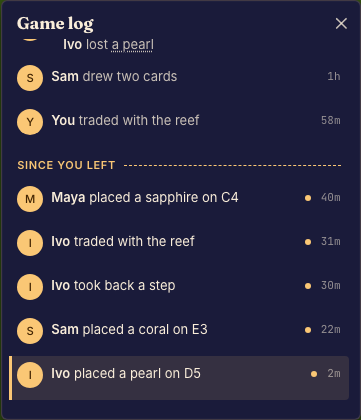
table.log(line) adds a line to the step's log, which every viewer sees in the match's history. A step may write any number of lines, and so may setup for the opening. A line is a message: a key in the game's catalogs (Text in the player's language) and the values of its placeholders. Each viewer's client shows it in their own language. Build a message with msg! and log it as a line by the seat that took the step:
table.log(msg!("log.marks", cell = space_id.as_str()));
table.log(msg!("log.plays", card = link(face.clone(), msg!(format!("card.{face}")))));
Write each message in the catalog of the game's default locale, such as /src/i18n/en.json:
{
  "log.marks": "{player} marks cell {cell}",
  "log.plays": "{player} plays {card}"
}
Boardweaver fills {player} with the line's player, shown by name. Leave {player} out of a message that names no one. Import msg, link and player from boardweaver_sdk.
The build checks every msg! whose key is a string literal against the default catalog: a key the catalog lacks, a value its message has no placeholder for, a placeholder no value fills, a tag such as <b>, or a value named player does not compile, and the error points at the msg!. A key built at run time, such as msg!(format!("card.{face}")), is not checked, so a missing one shows as its key.
A placeholder takes one of these values:
| Value | Write | Shows |
|---|---|---|
| a number | count = 2, an i64, i32, u32 or usize |
the number in the viewer's language. Count with it in a plural: {count, plural, one {# card} other {# cards}} |
| text | name = "Ys", a &str or a String |
the text as it is, in every language, such as a name a player typed |
| a seated player | target = player(id) |
the player's name |
| another message | card = msg!("card.knight") |
that message in the viewer's language, such as a card's name |
| a link | card = link(key, msg!("card.knight")) |
the message as a control that useLogLinks hears. key is your own string, such as a card id |
To give a line another player, no player or a kind, build it with LogLine::new(message) and these methods. Import LogLine and LinePlayer from boardweaver_sdk.
| Method | Sets | Default |
|---|---|---|
.player(LinePlayer::Seat(id)) |
whose line it is, which {player} names: LinePlayer::Actor, LinePlayer::Seat(id) or LinePlayer::None |
LinePlayer::Actor, the seat that took the step |
.kind("combat") |
a label the client styles the line by: 1 to 32 characters of a-z, 0-9 and - |
none |
table.log(LogLine::new(msg!("log.round", round = 2)).player(LinePlayer::None));
- Every viewer reads every line, whatever they may see of the state. Name only public facts: "takes a card", never the card. This holds for the message, its values, the link keys, the kind and the player.
- The game logic knows seat ids, not names. Pass a seat with
player(id), and Boardweaver shows its name. - A message key that no catalog has shows as the key. The build catches a literal one.
- A line with
LinePlayer::Nonewhosemsg!has a literal key and a message that places{player}panics, since there is no player to fill it. With a key built at run time, the line shows as its key instead. - Write a line in each step that players should see as its own row in the game log. A step that writes no line joins another row (Other players' steps).
player(id)andLinePlayer::Seat(id)name a seated player. Any other id panics.- Boardweaver fills
playeritself. Amsg!that passes a value namedplayerdoes not compile, and aMessagegiven one by.argpanics. LinePlayer::Actoron the opening, which no seat took, has no player. A message that uses{player}on a line with no player shows as its key.- A step's lines have limits (Builds, limits and errors). Going past one panics.
Undo
table.allow_undo() marks the decision this step belongs to as one the seat may take back after it is committed. One call in any step of the decision is enough. The platform's undo takes back one step at a time, and reopens the rest of that decision as the seat's draft.
- Only a decision that ended with a
confirmstep can be undone after commit. A decision that ended by drawing randomness or by a reveal never can. - Draft steps not yet sent can always be taken back, with or without it.
- Undo stops at another seat's committed decision.