Display match history
API
| Hook | Contract |
|---|---|
useHistory(options?) |
options is { ownPanel?: boolean }: true hides Boardweaver's game log panel while the component is mounted, and Boardweaver's history button then opens and closes the game's log. Returns { entries: HistoryItem[]; more: boolean; open: boolean; setOpen: (open: boolean) => void }. entries is the match's log, oldest first, read from the opening to now and then each new row. more is true while later rows are still to be read. open is the game's log's state, always false while no mounted component passes ownPanel: true. See The log in the game. |
useLogLinks(handler) |
void. While the component is mounted, handler gets a LogLinkEvent, { type: "enter" | "leave" | "click"; key: string }, each time a player's pointer or focus first reaches a link in Boardweaver's game log (enter), both have left it (leave) or the player clicks it (click). key is the link's key from link(key, text). See Links in the log. |
Links in the log
A log line's link (link(key, text), Changing the state) is a control in Boardweaver's game log, on the match page and on the replay page. useLogLinks hears it: enter when the player's pointer or focus first reaches the link, leave once both have gone, and click on a click, each with the link's key. Each enter has one leave with the same key. A click on a link does not move the board. Show what the key names however the game likes, such as the card in a side panel, and clear it only on the leave of the key it shows:
const [shownCard, setShownCard] = useState<string | null>(null);
useLogLinks((event) => {
  if (event.type === "enter") setShownCard(event.key);
  if (event.type === "leave") setShownCard((shown) => (shown === event.key ? null : shown));
});
Every viewer reads every key, so a key names only what every viewer may see.
The log in the game
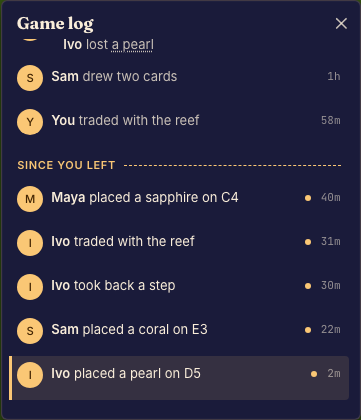
Boardweaver draws the match's log in its own panel. To keep the log in the game, for example in a side panel, draw it there and pass ownPanel: true from that component: Boardweaver then hides its panel while the component is mounted, and its history button, which keeps its count of the moves the player has not seen, opens and closes the game's log instead.
function LogSidebar() {
  const { open, setOpen } = useHistory({ ownPanel: true });
  if (!open) return null;
  return (
    <aside>
      <button onClick={() => setOpen(false)}>Close</button>
      <History kindStyles={{ combat: { color: "crimson" } }} />
    </aside>
  );
}
<History /> draws the log as Boardweaver's panel does, in the text color of where it is placed and the theme's colors.accent.500: each decision under its player, the rows the player missed marked, and the row on the board marked with a bar in colors.accent.500 along its leading edge over a tint of that color. A tap on a row moves the board there, and its links reach useLogLinks. The words Boardweaver writes itself (a row for a move or an opening your game wrote no line for, an undo, the divider above the rows the player missed, and each row's age) are in the language the frame shows your game in, which the frame's document names in its lang and dir.
<History /> is its own scrolling element (overflowY: "auto" unless style sets overflowY or overflow), so it never scrolls the game's page. To make the log scroll, give it a maxHeight in style, or another bound on its height. It then scrolls as Boardweaver's panel does. It opens with its newest row at the bottom. While the player stays at the bottom, it keeps each new row in view. Each time another row becomes the row on the board, it scrolls that row into view. Rows that arrive while the board stays on its row never make it scroll. <History /> lays its rows out from the bottom up with display: "flex" and flexDirection: "column-reverse". Its style takes every CSS property but those two. A wrapper that scrolls instead keeps the browser's own scrollbar, and <History /> never scrolls it. The log's own scrollbar is thin and in the log's text color. Set scrollbarColor (the thumb's color, then the track's) or scrollbarWidth ("auto", "thin" or "none") in style to change it. Each one replaces only its own default, so this scrollbar stays thin:
<History style={{ maxHeight: 320, scrollbarColor: "#b8862b transparent" }} />
Chrome and Edge ignore ::-webkit-scrollbar rules on an element whose scrollbarColor or scrollbarWidth is not "auto", and the elements inside <History /> take its scrollbarColor. To style the log's scrollbar with those rules in a <style> element, set both to "auto" in style.
To draw the log yourself, read useHistory().entries: each line is a FormattedLine, as in What changed. A decision's steps hold every step, also a step that writes no line, which Boardweaver's log joins to another row. endsLogRow is true on the last step of each of Boardweaver's rows, so a log that groups steps by it shows the same rows. While more is true, the last step read of the latest decision can be false: its row goes on in steps not read yet, so draw it as a row that is still open.