The React client
The client draws the board and sends the seat's moves. It decides no rule: what the seat may do comes only from its offers. Exact hook signatures are in boardweaver/react reference.
The file
The entry is /src/frontend.tsx. A match cannot load without it.
- Default export: the board component, which takes no props. The build fails without it.
GameOver(optional named export): the end screen. See Game over.
The client may import only:
react(React 18):useState,useEffect,useLayoutEffect,useMemo,useCallback,useRef,useReducer,useContext,useId,useImperativeHandle,useSyncExternalStore,useTransition,useDeferredValue,useDebugValue,startTransition,createContext,forwardRef,memo,Fragment,Component,StrictMode,createElement,cloneElement,isValidElementandChildren. Nothing else: noSuspenseorlazy. For a portal, usePortalfromboardweaver/ui.react/jsx-runtime, which JSX uses.boardweaver/react: the hooks and types in boardweaver/react reference.boardweaver/motion,boardweaver/uiandboardweaver/dnd: animation, accessible controls and drag and drop, in Client libraries.boardweaver/game: the zod schema and type of each client type the game logic defines, in Client types.zod:zandZodError, in Client libraries.react-intl: the components anduseIntl()that show the game's text from its catalogs, in Client libraries and Text in the player's language.- The game's own
.tsand.tsxfiles, by a relative path (./board) or a/src/path (/src/board). - The game's own
.jsonfiles, by their full path, as the JSON value they hold. A file in/src/data/is one the game logic can read too: see Data files.
Any other import fails the commit with Cannot resolve import. That includes npm packages, react-dom, boardweaver/immer and CSS files. Style with the style prop or a <style> element.
The client has no network, no eval, no workers and no browser storage. It may load images from the game's art and fonts from Google Fonts, and plays the game's sounds with useSounds() (Sounds).
Drawing the board
Draw the board from useBoard(), the seat's view with its draft applied, and make only the offers of useOffers() clickable:
import { useMemo } from "react";
import { useAct, useOffers, useBoard, type Action } from "boardweaver/react";

export default function App() {
  const board = useBoard();
  const offers = useOffers();
  const act = useAct();

  const offerBySpace = useMemo(() => {
    const bySpace = new Map<string, Action>();
    for (const { action } of offers) {
      if (action.type === "SpaceClick") bySpace.set(action.spaceId, action);
    }
    return bySpace;
  }, [offers]);

  if (!board) return null;
  return (
    <div role="grid">
      {board.spaces.map((space) => {
        const offer = offerBySpace.get(space.spaceId);
        return (
          <button key={space.spaceId} disabled={!offer} onClick={() => offer && act(offer)}>
            {space.pieces?.[0]?.publicKind ?? ""}
          </button>
        );
      })}
    </div>
  );
}
- The board is JSON in camelCase:
spaces[].spaceId,pieces[].publicKind,publicState,metaData. Parse a map with the schema of its type fromboardweaver/game, as Client types shows. - Pieces have no ids. Use the space id and the index as React keys.
- A piece click names the piece by its index in this board:
{ type: "PieceClick", spaceId, index }. useOffers()is empty for a spectator, on another seat's turn, and while a decision is on its way.
Taking a step
act(action) takes one step and answers at once:
type |
Means |
|---|---|
applied |
A choice or cancel step joined the draft. The board already shows it. |
sent |
The step ended the decision, which is on its way to Boardweaver. |
failed |
The step was not taken. reason.code says why. |
act belongs to the board of the render that created it. Call it once per event. A second act call in the same handler, or one from a timer or after an await, fails as STALE.
To take several steps from one event, such as a form that collects several values, pass them as a list: act([first, second, third]). Each step applies to the board the step before it left, each joins the decision as its own step, and only the last may end it. When a step fails, the steps before it stay in the decision, the rest are not taken, and the failed outcome's applied says how many joined.
Commands, confirm and cancel
The client draws a control for each offer that is not a board click:
- A
Commandoffer: a button with the offer'slabel, written withuseMessageText(). - A
confirmoffer: the button that ends the decision, such as "Take". - A
canceloffer: a switch or take-back, such as clicking another staged card. - An offer with an
input: a field. ForText, offer thesuggestionsand accept up tomaxLencharacters. ForInteger, acceptmintomaxonstep. Send the value in the action:act({ ...offer.action, value }).
useDraft() lists the draft's steps, so the client can show what the seat chose so far.
What the client must draw
Boardweaver draws a bar under the board: the menu, the controls for other players' steps, rules, sound, full screen and leave. It shrinks the area your client draws in to fit above the bar. On the board it draws only a card when the player returns and each step's log lines while steps play (Other players' steps). The client draws:
- whose turn it is:
board.activePlayerIdsanduseSelf()?.isActive; - names, avatars and which seats are bots:
usePlayers(); - scores during play:
useScores(); - the Undo button:
useUndo(); - what changed: log lines and movements from
useLastChange(); - decisions on their way:
usePending(); - failures:
useFailures(); - light and dark colors:
useColorMode()anduseGameTheme()(Design the theme).
Undo
const undo = useUndo();
<button onClick={() => undo.undo()} disabled={undo.available === "none"}>Undo</button>
available is draft (takes back the last draft step at once), server (asks Boardweaver to take back the last committed step) or none. The game logic decides what may be taken back (Changing the state).
Decisions on their way
usePending().pending is the one decision or undo on its way. When its predicted is true, the board already shows the result. When it is false, the step draws randomness or reveals: show that the move is on its way, and the board updates when Boardweaver answers.
Failures
useFailures().failures keeps every failed step and refused decision until the client calls dismiss(id). Show each one and let the player dismiss it. When Boardweaver refuses a decision, its steps that are still legal come back as the draft, and the player confirms again.
An offer's label and the reason the game logic refused a step (a refusal of GAME, which a REFUSED failure and a SERVER_REFUSED one can both carry) are messages from your catalogs. useMessageText() gives the function that writes one as text in the language the frame shows your game in, each player it names by name:
const text = useMessageText();
const refusal = "refusal" in failure.reason ? failure.reason.refusal : null;
const why = refusal?.refused === "GAME" ? text(refusal.reason) : null;
What changed
useLastChange() gives the last change: steps, each with actorPlayerId, lines and movements, or an undo. Each line is a FormattedLine: the line's message (Changing the state) in the language the frame shows your game in. Its playerId is the line's seat (null for none), its kind is the game's label, and its parts are a string, a player { playerId, name } or a link { key, parts } each. lineText joins a line's parts into one string, with each player's name:
const step = useLastChange().steps.at(-1);
const text = (step?.lines ?? []).map(lineText).join(" ");
Draw the parts yourself to style a player or a link. useDraft() gives the steps of the player's open decision with their lines in the same form.
Each movement is Moved, Added, Removed, Flipped or Shuffled, with positions as { type: "At", spaceId, index }, or { type: "Hidden", spaceId } for a hidden piece. Animate them in your own components, with boardweaver/motion (Client libraries). Forward over a game log row of several steps, such as a piece dragged across squares before it is placed, comes as one step with the row's lines and its net movements: each piece moves once, from where it was to where the row left it, so animate it as any other step. When coalesced is true, the board jumped (first load, reconnect, undo, skip to now, step back, a jump to a move on a replay's slider or move log, or a Forward over a row whose pieces cannot be followed, such as one that shuffles a deck or flips a card inside a hidden group): show the new board without animating. direction is back when the player stepped or jumped back: show the earlier board, and never play its movements in reverse.

Other players' steps
Boardweaver shows the steps of other players (people and bots alike) one at a time, in order, even when several arrive together. useLastChange() reports each one as it is shown. Each step stays on the board long enough for the player to read its log lines and see its movements (Step time).
usePlayback() says where the board is. status is now when the board is the match as it stands. It is playing or paused while the board shows an earlier board. That is a step the player has not seen, a step they went back to, or, on return, the board they last saw. Then useBoard() is that earlier board, useOffers() is empty, useDraft() has no steps, and an act or Undo fails as PLAYING. The player's draft comes back at now. useScores() and useMatch() still describe the match as it stands, so do not show scores beside an earlier board as if they belonged to it.
When a player opens a match after other players moved, useMatch().ready is false until the first page of the steps they missed arrives (boardweaver/react reference). Then the board shows the last board they saw, with status paused. A spectator opens at now.
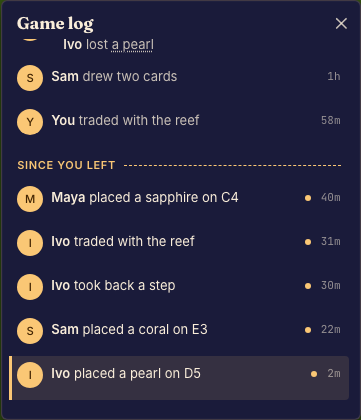
Boardweaver then covers the board with a card: how many rows of the game log the player missed, Watch, Skip to now, and Always skip to now in this match. Watch plays the missed steps, and Skip to now jumps to now without playing them. While the player watches, the bar under the board has Back, Play or Pause, Forward and Skip to now, and plays at 1x. Play shows every step, but Back and Forward move one row of the game log at a time: Forward to the end of the next row, past the steps that wrote no line, and Back to the end of the row before. Each step's log lines show with their players' names in a bubble over the bottom center of the board. Steps that arrive while the match is open play on their own, with the same bubble. At now, the bar offers Back and the game log, oldest first, with the rows the player missed marked. Each step that writes lines is a row. A step that writes no line joins the row before it in the same decision, or the decision's first row when no earlier step writes a line. A decision whose steps write no line is one row: the player's name and "made a move". A tap on a row moves the board to its last step. On a phone the log rises from the bar with a swipe up.
Keep the bottom center of the board free of anything the player reads while steps play, or draw your own controls: pass ownControls: true, and Boardweaver hides its card, its bubble and its step controls while that component is mounted. Then give the player pause, play, stepForward, stepBack, skipToNow and setSpeed, and always show skipToNow while status is not now, so the player can reach the board they act on:
const playback = usePlayback({ ownControls: true });
{playback.status !== "now" && <button onClick={playback.skipToNow}>Skip to now ({playback.behind} behind)</button>}
Step time
At 1x, Boardweaver shows each step of other players for at least this time:
| The step has | Time at 1x |
|---|---|
| log lines | 800 ms, plus 55 ms for each character of their text, from 1500 ms to 5000 ms |
| movements and no log lines | 700 ms, plus 100 ms for each movement after the first, up to 1500 ms |
| no log lines and no movements | 250 ms |
An undo stays for 600 ms. The speed divides each time: at 2x, a step of 1800 ms stays for 900 ms.
Call useStepDuration in every client that animates a change, such as a piece that slides or a card that flips. Give it the time your animations take. Boardweaver shows each step for the longer of your time and the time in the table. Without it, the next step can start before your animation ends.
Give every step one time:
useStepDuration(1200);
Or compute the time from your animations. This client slides a piece for 450 ms and flips a piece for 300 ms. It adds 400 ms so the player sees the result:
import type { LastChange } from "boardweaver/react";

const SLIDE_MS = 450;
const FLIP_MS = 300;
const SETTLE_MS = 400;

export const stepTime = (change: LastChange) =>
  change.steps.reduce((total, step) => {
    const slides = step.movements.filter((movement) => movement.type === "Moved").length;
    const flips = step.movements.filter((movement) => movement.type === "Flipped").length;
    return total + slides * SLIDE_MS + flips * FLIP_MS + SETTLE_MS;
  }, 0);
Then call useStepDuration(stepTime) in the component that draws the board.
Links in the log
A log line's link (link(key, text), Changing the state) is a control in Boardweaver's game log, on the match page and on the replay page. useLogLinks hears it: enter when the player's pointer or focus first reaches the link, leave once both have gone, and click on a click, each with the link's key. Each enter has one leave with the same key. A click on a link does not move the board. Show what the key names however the game likes, such as the card in a side panel, and clear it only on the leave of the key it shows:
const [shownCard, setShownCard] = useState<string | null>(null);
useLogLinks((event) => {
  if (event.type === "enter") setShownCard(event.key);
  if (event.type === "leave") setShownCard((shown) => (shown === event.key ? null : shown));
});
Every viewer reads every key, so a key names only what every viewer may see.
The log in the game
Boardweaver draws the match's log in its own panel. To keep the log in the game, for example in a side panel, draw it there and pass ownPanel: true from that component: Boardweaver then hides its panel while the component is mounted, and its history button, which keeps its count of the moves the player has not seen, opens and closes the game's log instead.
function LogSidebar() {
  const { open, setOpen } = useHistory({ ownPanel: true });
  if (!open) return null;
  return (
    <aside>
      <button onClick={() => setOpen(false)}>Close</button>
      <History kindStyles={{ combat: { color: "crimson" } }} />
    </aside>
  );
}
<History /> draws the log as Boardweaver's panel does, in the text color of where it is placed and the theme's colors.accent.500: each decision under its player, the rows the player missed marked, and the row on the board marked with a bar in colors.accent.500 along its leading edge over a tint of that color. A tap on a row moves the board there, and its links reach useLogLinks. The words Boardweaver writes itself (a row for a move or an opening your game wrote no line for, an undo, the divider above the rows the player missed, and each row's age) are in the language the frame shows your game in, which the frame's document names in its lang and dir.
<History /> is its own scrolling element (overflowY: "auto" unless style sets overflowY or overflow), so it never scrolls the game's page. To make the log scroll, give it a maxHeight in style, or another bound on its height. It then scrolls as Boardweaver's panel does. It opens with its newest row at the bottom. While the player stays at the bottom, it keeps each new row in view. Each time another row becomes the row on the board, it scrolls that row into view. Rows that arrive while the board stays on its row never make it scroll. <History /> lays its rows out from the bottom up with display: "flex" and flexDirection: "column-reverse". Its style takes every CSS property but those two. A wrapper that scrolls instead keeps the browser's own scrollbar, and <History /> never scrolls it. The log's own scrollbar is thin and in the log's text color. Set scrollbarColor (the thumb's color, then the track's) or scrollbarWidth ("auto", "thin" or "none") in style to change it. Each one replaces only its own default, so this scrollbar stays thin:
<History style={{ maxHeight: 320, scrollbarColor: "#b8862b transparent" }} />
Chrome and Edge ignore ::-webkit-scrollbar rules on an element whose scrollbarColor or scrollbarWidth is not "auto", and the elements inside <History /> take its scrollbarColor. To style the log's scrollbar with those rules in a <style> element, set both to "auto" in style.
To draw the log yourself, read useHistory().entries: each line is a FormattedLine, as in What changed. A decision's steps hold every step, also a step that writes no line, which Boardweaver's log joins to another row. endsLogRow is true on the last step of each of Boardweaver's rows, so a log that groups steps by it shows the same rows. While more is true, the last step read of the latest decision can be false: its row goes on in steps not read yet, so draw it as a row that is still open.
Scores
useScores() is keyed by the player id as a string: scores[String(playerId)].publicPoints. Each seat sees every seat's publicPoints and only its own privatePoints. The game logic names no score columns: name each column in the client, with a message from your catalog, such as in GameOver.
Layout
useViewport() gives the size of the area your client draws in. It changes when the player resizes the window, rotates a phone or enters full screen. Size the board from it, or choose a layout from it. The tic-tac-toe client sizes its cells from the width, less its padding and gaps:
import { useViewport } from "boardweaver/react";

const PADDING = 16;
const GAP = 6;

function useCellSize() {
  const { width } = useViewport();
  return Math.max(32, Math.min(88, Math.floor((width - 2 * PADDING - 2 * GAP) / 3)));
}
Text in the player's language
Write every word your client shows in a catalog, never in the code. A catalog is /src/i18n/<locale>.json: one JSON object that maps each message key to its message, in ICU MessageFormat, so a translator can translate it without reading your code. The tic-tac-toe client's catalog is /src/i18n/en.json (get_example with tic-tac-toe-rust-catalog):
{
  "status.yourMove": "Your move",
  "status.toMove": "{name} to move",
  "headline.wins": "{name} wins"
}
Show a message with react-intl, by its key, with the values its placeholders name:
import { FormattedMessage, useIntl } from "react-intl";

function Status({ active }: { active: string }) {
  const intl = useIntl();
  return (
    <strong aria-label={intl.formatMessage({ id: "status.toMove" }, { name: active })}>
      <FormattedMessage id="status.toMove" values={{ name: active }} />
    </strong>
  );
}
- The frame chooses the language. It shows the game in the first of the player's languages that is one of the game's locales, else in its default locale (Which locale a player sees).
- Format numbers, dates and lists with react-intl too, such as
<FormattedNumber value={score} />, so they follow the language. - The build checks every key you write as a literal. A
<FormattedMessage id>, theidofformatMessage's first argument, or anidinsidedefineMessagesthat your default catalog lacks fails the build at its file and line. A key you build at run time, such as`card.${face}`, is not checked, and shows as the key when the catalog lacks it. - Text from the game logic comes from your catalogs too. Log lines, offer labels and refusal reasons are messages, which the frame formats in the language it shows your game in (Changing the state, Failures).
Which files and messages a catalog may hold, and the errors a bad one gets, are in Catalogs. To translate the whole game, follow Translate a game.
Images
Resolve uploaded art with useImage(key). The key belongs to the game's art library. The hook returns undefined when the image is unavailable. Render a fallback rather than an image with a missing source.
import { useImage } from "boardweaver/react";

export function CardBack() {
  const image = useImage("CardBack");
  return image ? <img src={image} alt="Card back" /> : <span>Card</span>;
}
Renaming an art key also requires updating its client references. Use the uploaded image URL rather than fetching an external asset.
Sounds
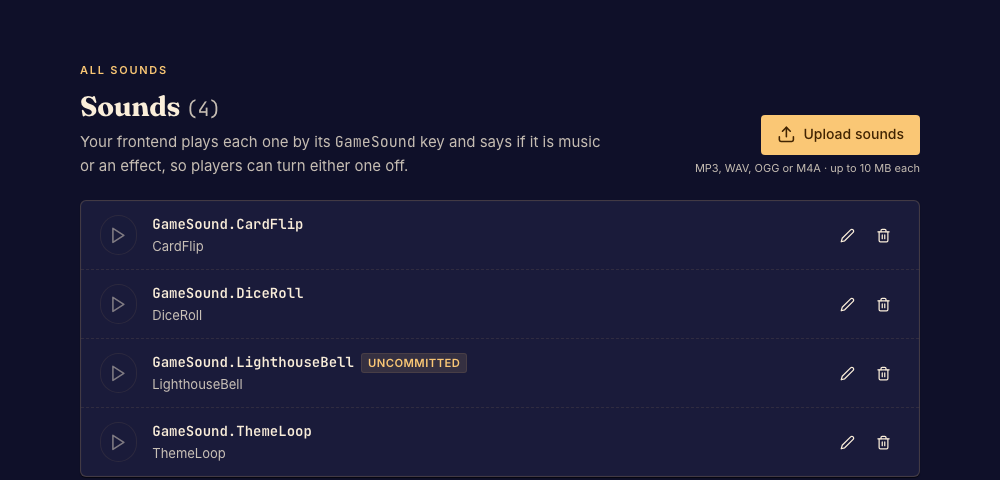
Upload each sound with upload_sound or Upload sounds in the studio's Sounds view: MP3, WAV, OGG or M4A, at most 10 MB, under a key of UpperCamelCase ASCII letters and digits, such as DiceRoll. Uploading needs the Designer or Professional plan, and every player hears the game's sounds whatever their plan. An upload is a pending change, which the studio preview plays at once and commit makes permanent. A sound lives at /sounds/<Key>: upload the same key again to replace it, move it with rename_file and remove it with delete_file, then change every key the client plays to match. A sound is fetched the first time it plays.
Play a sound by its key with useSounds(). Say at each play whether it is "music" (a soundtrack or an ambient loop) or an "effect" (a sound that answers a step):
import { useEffect } from "react";
import { useLastChange, useSounds } from "boardweaver/react";

export function GameSounds() {
  const sounds = useSounds();
  const change = useLastChange();

  useEffect(() => {
    const theme = sounds.play("ThemeLoop", { type: "music", loop: true });
    return () => theme.stop();
  }, [sounds]);

  useEffect(() => {
    if (change.coalesced || change.direction === "back") return;
    if (change.steps.some((step) => step.movements.length > 0)) {
      sounds.play("PiecePlaced", { type: "effect" });
    }
  }, [change, sounds]);

  return null;
}
play(key, { type, loop?, volume? })returns{ stop() }. It throws for a key the game has no sound for.volumeis 0 to 1, and iOS Safari ignores it.stopAll(type?)stops every playing sound, or every one of a type.- Play each step's sound from an effect on
useLastChange(), so it plays as Boardweaver shows the step, for the player's own steps and other players' alike. Skip acoalescedchange and one whosedirectionisback, as for animation. - Start music in an effect and stop it in the cleanup, so it ends with the component.
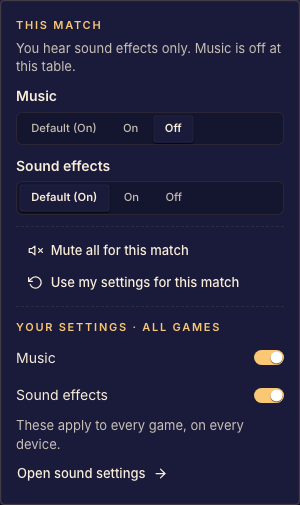
Each player turns music and effects on and off, for every game or for one match, from the sound control on the bar. Boardweaver applies it: an effect played while effects are off does nothing, and music plays muted while music is off, so it is in the right place when the player turns it back on. useAudioSettings() gives { music, effects }, only to show the player's choice in your own controls.
Browsers play no sound until the player presses or types in the game. Music started before that starts at the first press. An effect played before it is dropped.
Sound made with Web Audio ignores the player's settings, so a player who turned sound off still hears it. Upload a file and play it with useSounds() instead.
Game over
When the match is finished and the board has shown every step (usePlayback().status is now), Boardweaver renders GameOver after the board, if the game exports it. The replay of a finished match never renders GameOver. It covers the board itself (for example position: "fixed", inset: 0) and offers the end controls:
export function GameOver() {
  const end = useMatchEnd();
  return (
    <div role="dialog" style={{ position: "fixed", inset: 0 }}>
      {end.startsNextMatch && (
        <button onClick={end.nextMatch} disabled={end.nextMatchPending}>Next match</button>
      )}
      <button onClick={end.returnToGames}>Return to games</button>
    </div>
  );
}
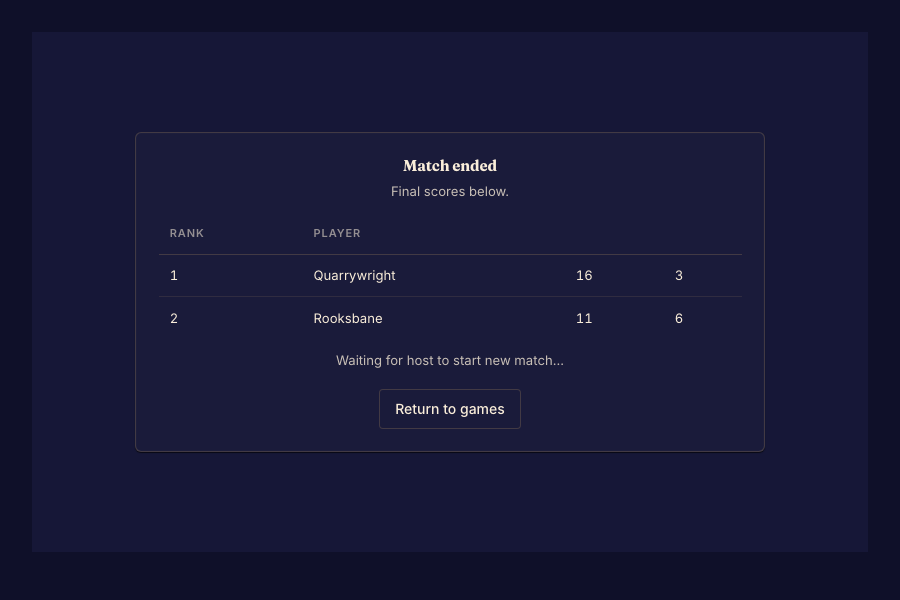
Without a GameOver export, Boardweaver shows its own end screen with the results and the next-match and return buttons. Its score columns have no names, because the game logic names none: export GameOver to show what each column means. With one, Boardweaver shows nothing at the end, so GameOver must show the result. A match can also end without a winner when it is locked by an error, or when a player leaves it: usePlayers() then marks who left with abandoned, and isGameOver may still be false. Write the end screen for those cases too.
Spectators
A spectator's client renders the same component. useSelf() is null, useMatch().viewer is null, and there are no offers. A spectator starts at now, and sees each player's steps one at a time, as a seated player does.