Images and sounds
Everything your game displays (piece art, card faces, textures, ornament, type) is either an uploaded asset addressed by a key, or something you draw in the client. This section covers which is which, and the exact limits of each.
Quick answers
| Question | Answer |
|---|---|
| What image formats can I upload? | JPEG and PNG only. Detected from the bytes; renaming a file does not help. |
| Can I upload an SVG? | No, but inline <svg> in your React tree is unrestricted. See Vector art. |
| Can I upload a WebP? | No. It is detected and rejected by name. |
| Max image size? | 5 MB per file. |
| Do images count against the 1024 KB bundle? | No. They are fetched by URL. Only base64 inlined in source does. |
| How do I replace an image? | upload_art with the same key. |
| How do I delete an image? | delete_file with /art/<Key>, or Delete on the image in the studio's Art view. |
| How do I rename an image? | rename_file from /art/<Key> to /art/<NewKey>, or Rename in the Art view. Update every GameImage.<Key> reference. |
| Can I use a custom font? | Yes: Google Fonts, loaded by your own client code. Nothing else. |
| Can I self-host a font or inline one as base64? | No. font-src permits only fonts.gstatic.com. |
Do data: URIs work? |
Yes for <img src>, no for font-src, no for a stylesheet <link>. |
| Can I fetch anything at runtime? | No. connect-src 'none', so fetch/XHR/WebSocket are compile errors. |
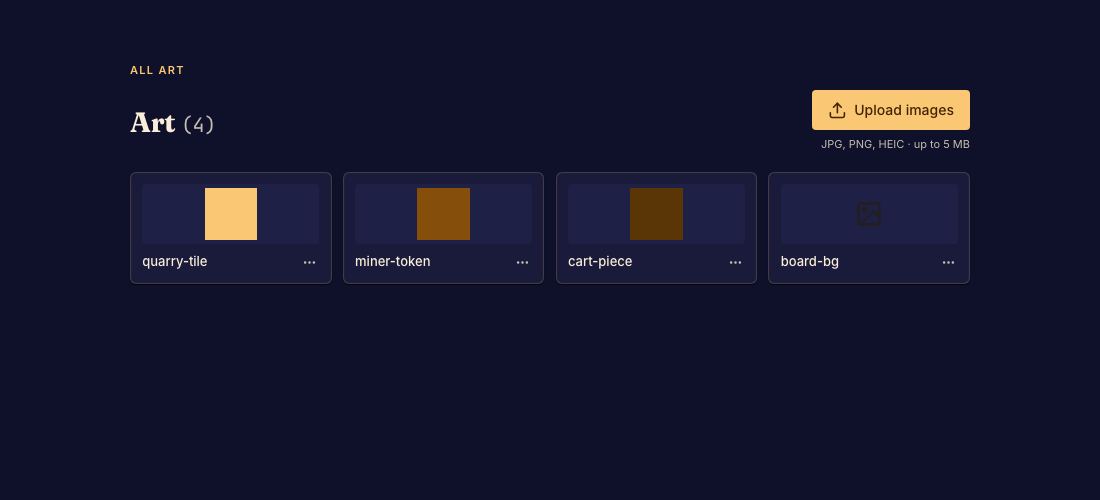
Images
The contract
| Formats | JPEG or PNG. The format is read from the decoded bytes, never from the filename or a declared MIME type. |
| Size | 5 MB per image. |
| Key | UpperCamelCase ASCII alphanumerics: ^[A-Z][A-Za-z0-9]*$. Validated before the bytes are even fetched. |
| State | An upload is a pending worktree change. It appears in the studio preview immediately and becomes permanent on commit. |
A rejected upload tells you what it detected, so the error is diagnostic:
UNSUPPORTED_IMAGE_FORMAT: Only JPEG and PNG are supported (detected 'svg').
upload_art and upload_marketing_image return INVALID_IMAGE for incomplete or unreadable image data. Upload a complete JPEG or PNG file.
Using an image
Keys become members of the per-game GameImage enum exported by "boardweaver", regenerated as
you upload, and visible to both /src/game.ts and /src/frontend.tsx.
import { GameImage } from "boardweaver";
import { useImage } from "boardweaver/react";

function PieceArt() {
  const src = useImage(GameImage.AbyssalPredator);
  return <img src={src} alt="" />;
}
useImage is a hook: call it unconditionally at the top level. Resolving a variable-length list
of keys inside a .map() changes hook order between renders and will break. Resolve one key per
component, or resolve the whole set once at a stable call site.
The result is a plain URL, usable in <img src> or as a CSS background-image, including
layered, masked, filtered, or blended.
Replacing, renaming, and deleting
The two upload paths behave differently, and the difference bites.
upload_artwith an explicit key uses that key verbatim. Re-uploading an existing key replaces the image in place. This is how you swap art.- The studio's upload button posts only a filename. The server derives a key from it and, on
collision, appends the first free integer ≥ 2:
XPiece→XPiece2→XPiece3. It never replaces. Uploading a correctedknight.pngthrough the UI gives youKnight2, not a newKnight. A filename that starts with a digit gets anImageprefix, so1-card.pngbecomesImage1Card.
Renaming and deleting. Art lives in the worktree at /art/<Key>, the same path list_files
reports. Both changes are pending until you commit, and both change the GameImage enum:
rename_filemoves/art/XPieceto/art/CrossPiece. The new key follows the same UpperCamelCase rule, the image is not re-uploaded, and a rename never overwrites an existing key.delete_fileremoves/art/XPiece.- Both accept an existing key the enum cannot hold, such as
/art/1Card, so you can rename it to a valid key or delete it. - The studio's Art view offers both on each image, and the Code view can rename an image in the file tree and delete the one that is open.
Code that still says GameImage.XPiece stops compiling after either change, so update those
references in the same commit. Matches already running keep the commit they started on, so they
keep their art.
Marketing art is the exception: see Marketing images.
Uploading in bulk
Pass image bytes inline only for a handful of files; a few hundred card faces will exhaust an agent's context. Mint a token and POST the files directly instead:
curl -X POST "https://www.boardweaver.com/api/tool/art" \
  -H "Authorization: Bearer $TOKEN" \
  -F key=AbyssalPredator -F [email protected]
This runs the same tool and returns the same result; the bytes simply never pass through the model. Two practical notes:
- Tokens expire after 5 minutes. A bulk script must be resumable: log each success and skip completed keys on re-run, rather than starting over.
- Responses are MCP-wrapped. The tool's JSON is a string inside
content[0].text, not the top-level body.
Naming as an interface
A key is the contract between your art and your code, so name for the thing depicted and keep one
image per thing. A card's front and back are two images with two keys; a counter and its flipped
side are two images. Deriving keys mechanically from game data (`${cardId}` for a portrait
face and `${cardId}Wide` for a landscape one) means adding content never requires touching
the art plumbing.
Vector art
SVG is not an uploadable asset, but the client can draw vectors freely. Three routes, in order of preference:
1. Inline <svg> in JSX, the primary answer. Writing SVG as React elements is DOM
construction, not a fetch, so the frame's CSP does not govern it at all. The whole language is
available: <defs>, gradients, <filter>, <mask>, <pattern>, <clipPath>. boardweaver/motion
exports motion.svg, so paths can animate (pathLength for a drawn-on stroke, for instance).
Inline SVG also composes with useGameTheme() and useColorMode(), so an ornament can recolor
itself per theme, something a raster asset cannot do.
2. data: URI in <img src>. Permitted (img-src includes data: and blob:). Note the
cost: the string is bundle bytes and counts against the 1024 KB cap.
3. Inline style or a rendered <style> element. style-src allows 'unsafe-inline', and a
<style> element is how you get pseudo-elements, @keyframes, and real cascade. You cannot touch
document, so render it as JSX. A <link> to a data-URI stylesheet will not load.
There is no server-side rasterizer. To serve vector art from the asset store (and keep it out of the bundle), export it to PNG yourself before uploading.
Fonts
Google Fonts, loaded by your own client code, is the supported path. The frame's CSP permits
https://fonts.googleapis.com for stylesheets and https://fonts.gstatic.com for the font files,
and nothing else.
export default function App() {
  return (
    <>
      <link
        rel="stylesheet"
        href="https://fonts.googleapis.com/css2?family=Cinzel:wght@500;700&display=swap"
      />
      <div style={{ fontFamily: '"Cinzel", Georgia, serif' }}>…</div>
    </>
  );
}
Reference the face by its real family name, and always pair it with a system fallback. Load one or two faces, not six: each is a render-blocking request on every match load.
What does not work, so you don't spend time trying:
- Self-hosted or base64
@font-face.font-srchas no'self', nodata:, and no media-bucket origin. A font file you upload or inline is CSP-blocked. GameFontand the/fonts/prefix. These exist in the type surface but nothing populates them; the enum is empty in practice./theme.json'sfontsblock. It stores font keys for the BWSS rules and marketing pages. The v2 React client does not resolve them to families and injects no@font-face. Readtheme.fontsfor authoring intent if you like, but map it to a real family yourself.
If no web font suits, system stacks are the fallback, and differentiating a display face from a body face matters more than either being custom.
Marketing images
Cover and logo art are separate from gameplay art. They occupy fixed slots rather than a key
namespace, are uploaded with upload_marketing_image (slot is cover or logo), always
overwrite in place, and, unlike gameplay art, can be removed. They are not members of
GameImage and are not addressable from game code.
Like any upload, a marketing image is a pending worktree change until you commit. Only the
studio's Marketing panel previews the pending image; the catalog card, the match lobby, the
studio game list and the game switcher all show the art of the commit the game currently exposes:
the published commit, else the public playtest commit, else HEAD. A game that is still in private
playtesting therefore shows its latest committed art everywhere.
What the frame permits
The client runs sandboxed on an opaque origin. Rather than infer what will load, this is the whole policy:
| Directive | Effect |
|---|---|
default-src 'none' |
Nothing loads unless listed below. |
script-src 'unsafe-inline' |
The frame runtime and your bundle, both inline. No external scripts load at all. |
style-src 'unsafe-inline' https://fonts.googleapis.com |
Inline styles and <style>; Google Fonts stylesheets. |
img-src <media bucket> data: blob: |
Uploaded art, data URIs, blob URLs. |
media-src <media bucket> data: blob: |
Uploaded sounds (see v2-sounds), data URIs, blob URLs. |
font-src https://fonts.gstatic.com |
Google Fonts files only. |
connect-src 'none' |
No fetch, XHR, WebSocket, or EventSource. These are compile errors. |
worker-src, object-src, base-uri, form-action |
All 'none'. |
The distinction that catches people: "no network access" refers to data. Subresource loads for images, sounds and fonts from the allowlisted origins are permitted and are the intended mechanism.
Bundle accounting
The client bundle is /src/frontend.tsx plus all of /src/game.ts, capped at 1024 KB after
minification. Uploaded images and Google Fonts are fetched by URL and cost nothing against it, so
high-resolution art is free: a few hundred 1024×1024 faces are fine.
What does count: executable code, and any asset inlined as a base64 string literal. Inlining is the fastest way to blow the limit; upload it and use a key.
validate_code reports only pass or fail: the measured byte size appears only in the failure
message, so there is no way to track headroom before exceeding it. Budget conservatively if your
rules engine is large, since it ships whether or not the UI touches it.
Next
react-frontend: the client contract, the sandbox boundary, and bundle accounting.react-match-api:useImagealongside the other derived hooks.v2-game-themes:/theme.json, including background layers.v2-entities:PieceDef.orientations, which references image keys.
A game's React frontend can play uploaded music and sound effects. You say at each play whether a sound is music or an effect, and each player decides, for every game or for one match, which of the two they hear.
Quick answers
| Question | Answer |
|---|---|
| What formats can I upload? | MP3, WAV, OGG and M4A. Detected from the bytes; renaming a file does not help. |
| Max size? | 10 MB per file. |
| Which plan can upload sounds? | Designer or Professional. Every player hears a game's sounds whatever their plan. |
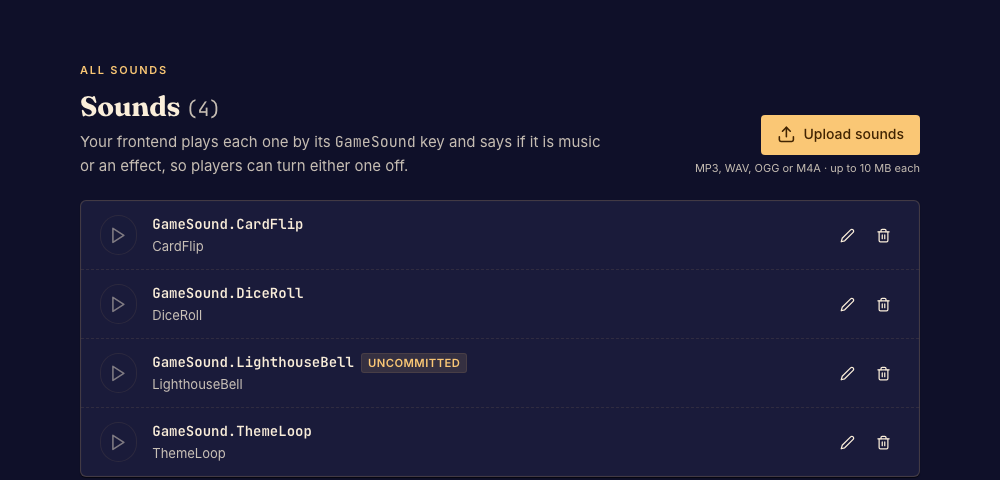
| Where do I upload? | upload_sound, or Upload sounds in the studio's Sounds view. |
| How do I play one? | useSounds().play(GameSound.Key, { type: "effect" }) from your frontend. |
| Music or effect? | "music" for a soundtrack or ambient loop, "effect" for a sound that answers an action. |
| Do sounds load with the game? | No. A sound is fetched the first time you play it. |
| Do sounds count against the 1024 KB bundle? | No. They are fetched by URL. |
| Why is there no sound before the first click? | Browsers hold sound until the player presses or types in the game. See Autoplay. |
| Can I synthesize sound with Web Audio? | It runs, but the player's settings cannot reach it. Upload a file instead. |
Uploading
| Formats | MP3, WAV, OGG or M4A, read from the bytes. The file is stored unchanged. |
| Size | 10 MB per file. |
| Key | UpperCamelCase ASCII alphanumerics: ^[A-Z][A-Za-z0-9]*$. The key becomes a GameSound member. |
| State | An upload is a pending worktree change. The studio preview plays it at once; commit makes it permanent. |
| Plan | Uploading needs the Designer or Professional plan, else PLAN_REQUIRED. |
Sounds live at /sounds/<Key>. Upload the same key again to replace a sound. Rename with
rename_file from /sounds/<Key> to /sounds/<NewKey>, and delete with delete_file; in both
cases update every GameSound.<Key> reference. A sound and an image may share a key: they are
different enums.
Most sound files are too large to pass inline through upload_sound. For a file on disk, call
generate_api_token and curl it to the uploadSound endpoint it returns. For a file already
online, pass its public https URL as sound.url. Keep inline sound.data for effects of a few KB.
Playing sounds
useSounds() returns the game's sound player. It is stable for the whole match.
import { useEffect } from "react";
import { GameSound } from "boardweaver";
import { useMatch, useSounds } from "boardweaver/react";

export default function App() {
  const match = useMatch();
  const sounds = useSounds();

  useEffect(() => {
    const theme = sounds.play(GameSound.ThemeLoop, { type: "music", loop: true });
    return () => theme.stop();
  }, [sounds]);

  return (
    <button
      onClick={() => {
        sounds.play(GameSound.DiceRoll, { type: "effect" });
        match.click({ type: "Click", buttonId: "roll" });
      }}
    >
      Roll
    </button>
  );
}
| Call | Does |
|---|---|
sounds.play(key, { type, loop?, volume? }) |
Plays the sound and returns { stop() }. Throws on a key that is not one of the game's sounds. |
sounds.stopAll(type?) |
Stops every playing sound, or every playing sound of one type. |
| Option | Meaning |
|---|---|
type |
Required. "music" or "effect": which of the player's settings governs it. |
loop |
Start again at the end. Defaults to false. |
volume |
0 to 1, default 1. Best effort: iOS Safari ignores it and plays at full volume. |
Start music in an effect hook and stop it in the cleanup, as above, so it ends when the component
does. Play an effect in the handler for the action it answers. To make a sound follow other
players' moves, play it from an effect on useLastChange (see react-match-api).
What the player hears
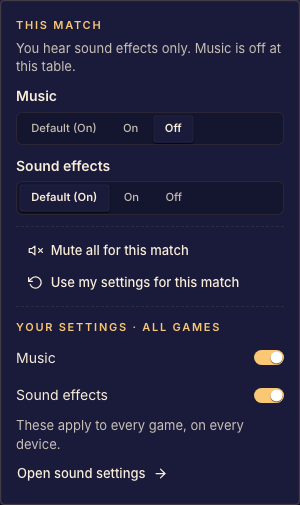
Each player has two account settings, music and sound effects, and can override either one for a single match from the sound menu at the table. You do not read or apply them: the player does it for you.
- An effect played while the player has effects off does nothing. It is not even loaded.
- Music played while music is off plays muted, so when the player turns music back on it is at the right place in the track.
- A change takes effect at once on everything that is playing.
useAudioSettings() returns { music, effects } as the player has them right now. Read it only to
show the player's choice in your own UI; useSounds already applies it.
Autoplay
Browsers do not play sound until the person has pressed or typed in the page. If your game starts music on load, the player begins the match in silence and the music starts at their first press in the game. An effect played before that first press is dropped, because the moment it belonged to has passed.
Web Audio
AudioContext and oscillators still run in the frame, which is how some games make 8-bit sound.
The player's music and effect settings cannot reach a sound you synthesize, so a player who turned
sound off still hears it. Upload a short file and play it with useSounds instead.